
YouTube resource
How to Export YouTube Data with Google Takeout
A YouTube data export uses Google Takeout with YouTube and YouTube Music selected. The focused workflow avoids starting with an account-wide archive and still lets you refine the YouTube data included.
The decision that matters
Choose the right export before you start
General Google Takeout starts with many products selected. The focused YouTube route narrows the first decision, then lets you review YouTube-specific options before choosing delivery and archive settings.
Current workflow
How to complete the current provider export
-
Open the Google Takeout page for YouTube data exports and sign in.
Open the first-party step -
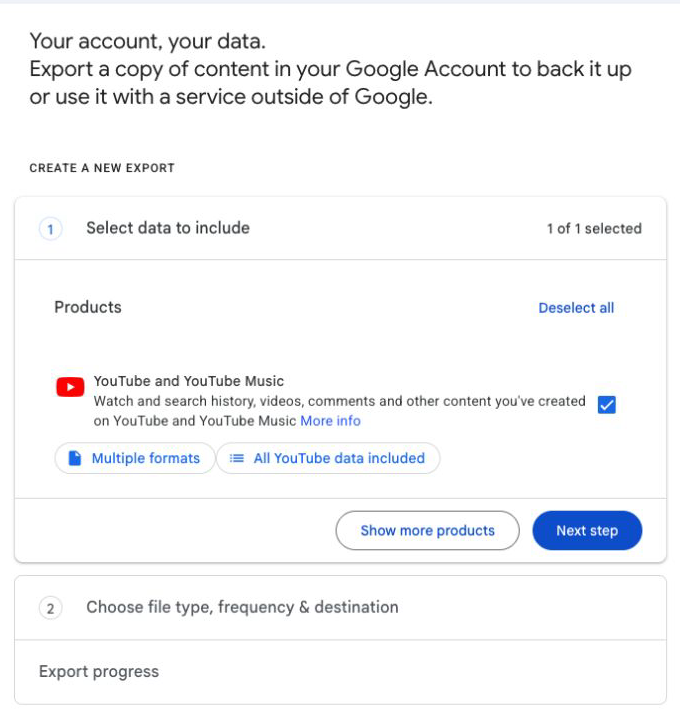
Confirm that YouTube and YouTube Music is the selected product; use its data-options control to refine the scope.
Open the first-party step -
Click Next step.
Open the first-party step -
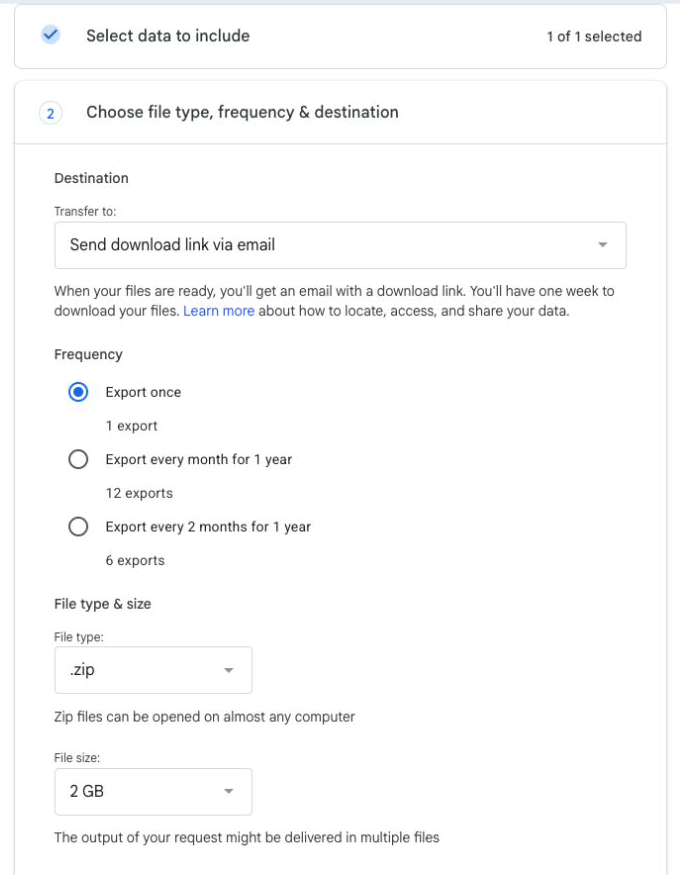
Choose the delivery method; Send download link via email keeps the archive out of a connected external destination.
Open the first-party step -
Set Frequency to Export once.
Open the first-party step -
Choose the file type and maximum file size; larger exports are split into multiple archives.
Open the first-party step -
Click Create export. Google emails you when the archive is ready.
Open the first-party step
Reviewed visual references
Match the current first-party screens
What this workflow covers
Useful output and next steps
- Opening the Takeout flow with YouTube and YouTube Music selected
- Refining the included YouTube data before continuing
- Choosing one-time delivery, file type, archive size, and creating the export
Objections and limits
What this resource does not promise
- YouTube exports are delivered through Google Takeout rather than a separate YouTube archive tool.
- Large exports can be split across multiple archive files.
- Download Your Data does not currently provide a YouTube analysis workspace.
Repository evidence
Current in-product visual guide route
#guide/youtubeThis exact route or input shape is maintained in frontend/application/routing.js.
First-party sources
Verify the provider workflow
Questions before you export
Frequently asked questions
Is a YouTube data export the same as a full Google Takeout?
It uses Google Takeout, but the focused route starts with YouTube and YouTube Music selected instead of requiring an account-wide export.
Can I choose which YouTube data to include?
Yes. Use the YouTube and YouTube Music data-options control before moving to the delivery step.
Where does Google send the YouTube archive?
You choose the delivery method. The guide highlights email delivery because it avoids connecting an additional external destination.
Continue with the right provider