
X (Twitter) resource
How to Download Your X Data Archive
An X data archive can include posts, media, direct messages, and profile information. The request begins in Your account settings and requires password plus email or phone verification.
The decision that matters
Choose the right export before you start
X separates the archive request from the eventual download and requires identity checks before the request begins. Make sure the account's password and verification destination are available before starting.
Current workflow
How to complete the current provider export
-
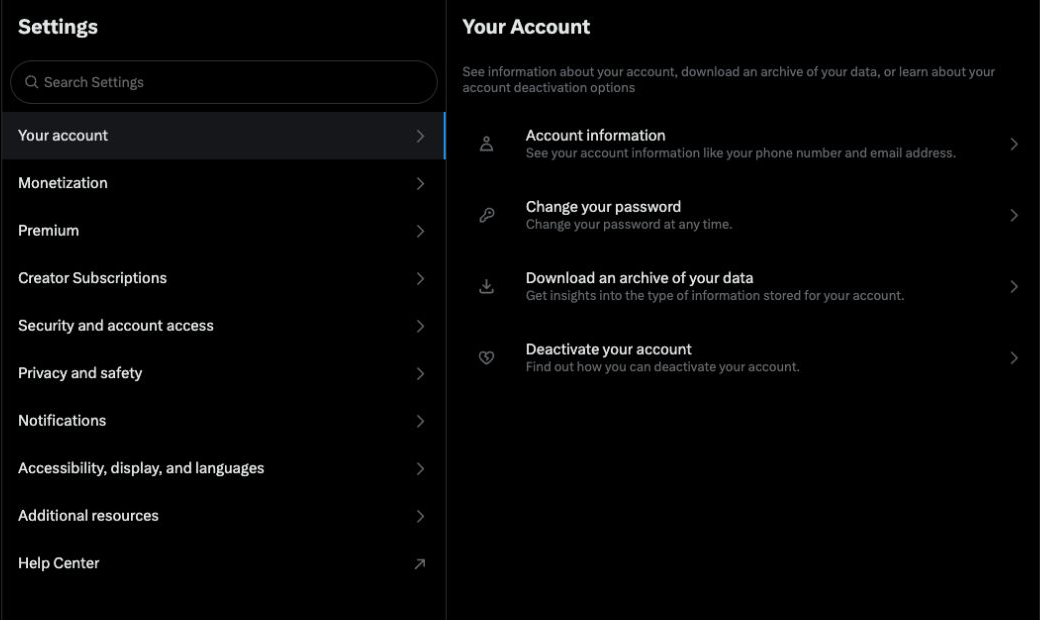
Web: More → Settings and privacy → Your account.
Open the first-party step -
Click Download an archive of your data.
Open the first-party step -
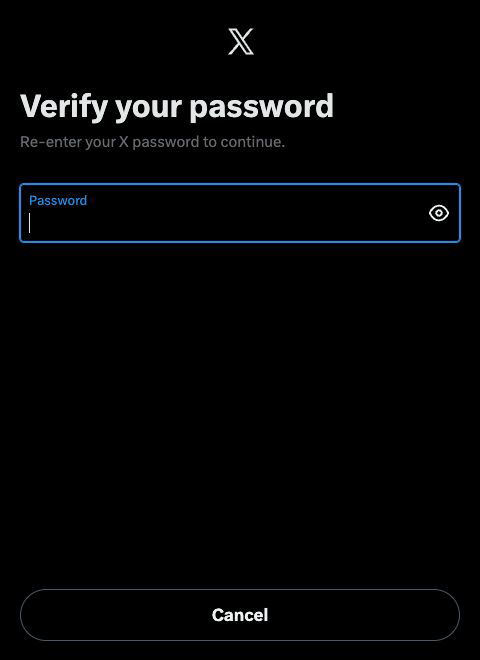
Enter your password and click Confirm.
Open the first-party step -
Click Send code, then enter the code sent to the email address or phone number on your account.
Open the first-party step -
Click Request data.
Open the first-party step -
Wait for the email or push notification; preparation may take a few days.
Open the first-party step -
Return to Download an archive of your data and click Download data, then download the ZIP while signed in.
Open the first-party step
Reviewed visual references
Match the current first-party screens
What this workflow covers
Useful output and next steps
- Finding Download an archive of your data under Your account
- Confirming the password and entering the email or phone verification code
- Returning while signed in after the email or push notification arrives
Objections and limits
What this resource does not promise
- Archive preparation may take a few days.
- The final download requires a signed-in X session.
- Download Your Data does not currently analyze the X archive.
Repository evidence
Current in-product visual guide route
#guide/xThis exact route or input shape is maintained in frontend/application/routing.js.
First-party sources
Verify the provider workflow
Questions before you export
Frequently asked questions
Where do I request an X data archive?
Open Settings and privacy, choose Your account, then select Download an archive of your data.
Why does X ask for a password and code?
The current request flow verifies the password and then sends a code to the email address or phone number on the account.
How do I know the X archive is ready?
X sends an email or push notification. Return to the archive page while signed in and use Download data.
Continue with the right provider